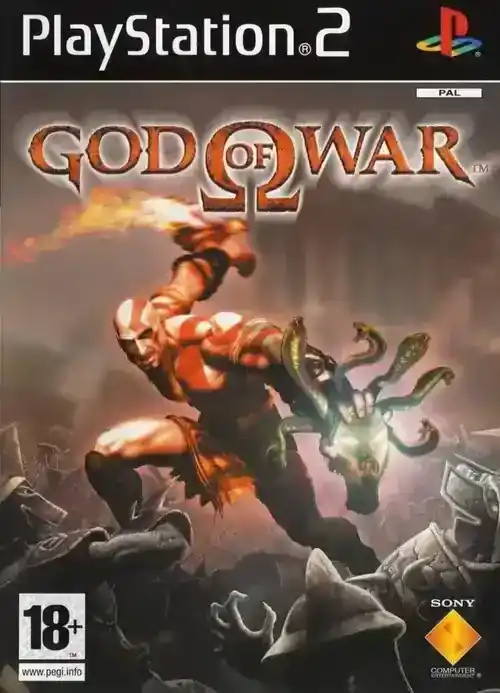
God of War
Experience the origins of Kratos’ wrath in this brutal mythological adventure.
God of War PS2 ISO: The Ultimate Emulation & Gameplay Guide
Set up PCSX2 the right way, optimize performance, and master Kratos' brutal combat in this complete God of War PS2 ISO guide for modern retro gamers.
Back in 2005, when most gamers were still discovering what the PlayStation 2 could truly accomplish, Santa Monica Studio dropped something absolutely revolutionary that changed the action-adventure landscape forever. God of War didn't just arrive on the scene—it kicked down the door and completely rewrote what we thought possible in the genre. This wasn't a typical hack-and-slash title; it was a brutal masterclass in cinematic storytelling, devastating combo-based combat, and mature themes that made parents double-check game ratings. Whether you're a retro gaming enthusiast looking to experience this legendary title through emulation or someone seeking to revisit Kratos' origins, this complete God of War PS2 ISO guide walks you through everything you need to know about setting up, playing, and mastering this masterpiece on PC.
PCSX2 Emulator Setup Guide
Setting up PCSX2 to run the God of War PS2 ISO is easier than it looks, as long as you follow a structured process. I've tested multiple builds and settings across mid‑range and high‑end PCs, and the steps below consistently deliver smooth performance and clean visuals.
Recommended PC Specs
- CPU: Intel Core i5 (3rd gen or newer) / AMD Ryzen 3 or better
- RAM: 8 GB minimum (16 GB recommended)
- GPU: Dedicated card with 4 GB VRAM (GTX 1060 / RX 580 or better)
- Storage: SSD with at least 50 GB free
- OS: Windows 10/11, Linux, or modern macOS build compatible with PCSX2
Step 1: Download PCSX2
Go to the official PCSX2 website and grab the latest stable build for your OS. Avoid random forks or ancient versions—recent builds are noticeably more stable and faster. Extract PCSX2 to a dedicated folder, for example:
C:\Emulators\PCSX2\on Windows~/Emulation/pcsx2/on Linux
Step 2: Add BIOS Files
PCSX2 needs real PS2 BIOS files. Legally, you should dump them from your own console. Once you have them (usually several .bin files), create a bios folder inside your PCSX2 directory and drop all BIOS files there. When you first launch PCSX2, it'll scan that folder and let you choose your default BIOS (USA, EU, or JP).
Step 3: Controller Configuration
Launch PCSX2, open the controller settings, and map your gamepad. I strongly recommend an Xbox or DualShock-style pad. Map:
- Square: Light attacks
- Triangle: Heavy attacks
- Circle: Grab / interact
- Cross: Jump
- L1/R1: Defensive / special actions
- L2: Block
- Right Stick: Camera
Step 4: Add Your God of War PS2 ISO
Place your God of War PS2 ISO into a games folder inside PCSX2. In PCSX2, go to Game List > Add Games Folder and point it at that folder. PCSX2 will scan and add God of War to the library automatically.
Step 5: Graphics Settings for Smooth Play
Right‑click God of War in the list > Properties (or Game Settings). Under graphics:
- Renderer: Direct3D 11/12 or Vulkan (whichever your GPU prefers)
- Internal Resolution: 2× or 3× native (720p–1080p equivalent)
- Anisotropic Filtering: 8× or 16× for crisper textures
- Texture Filtering: On (or Bilinear)
For God of War specifically, enable hardware hacks and tweak them if you see half‑screen lines or weird lighting. A common setup:
- Half‑Pixel Offset: Special
- Round Sprite: Half
- Sprite/Auto Flush: Enabled if you see artifacts
Step 6: Audio & Latency
In audio settings, select:
- Output: XAudio2 or WASAPI (on Windows)
- Sync Mode: TimeStretch
This keeps the soundtrack and SFX in sync with the action, even if your FPS wobbles during heavy scenes.
Story & Gameplay Overview
God of War (2005) is a raw revenge story wrapped in Greek mythology. You play as Kratos, a Spartan warrior haunted by the slaughter of his own family—a tragedy engineered by his former master, Ares, the current God of War. After a decade of serving the Olympian gods, Kratos is promised freedom from his nightmares if he can accomplish one impossible task: kill Ares.
The journey takes you across war‑torn Athens, the eerie Desert of Lost Souls, and the colossal Pandora's Temple chained to the back of the Titan Cronos. What I love about this structure is how the game moves seamlessly from grounded, gritty city battles to surreal, myth‑driven environments without ever losing pacing.
Gameplay blends three pillars:
- Combat: Aggressive, combo‑heavy encounters against mythological enemies.
- Puzzles: Lever, platform, and environment puzzles that break up the action.
- Platforming: Climbing walls, balancing across beams, and navigating deadly traps.
The camera is fixed and cinematic, framing set‑pieces like a movie. That means you're not wrestling with the right stick constantly; instead, the game chooses striking angles that showcase both the environment and the brutality of combat.
From my runs on PCSX2, the thing that holds up best is pacing. Combat arenas never drag on too long, puzzle segments arrive just when you need a breather, and the story beats land hard, especially once you learn the full extent of Kratos' past.
Combat & Mechanics Breakdown
The combat system is the spine of the God of War PS2 ISO experience. You're not just button‑mashing; you're managing space, timing, enemy types, and resource meters in a way that feels surprisingly tactical under all the blood.
Blades of Chaos – Your Core Weapon
Kratos' chains—blades fused to his arms—give you sweeping coverage around your body. Light attacks (Square) are fast and cover wide arcs, while heavy attacks (Triangle) hit harder and can launch enemies into the air. A basic but critical combo is:
- Square, Square, Triangle (□□△): A launcher that sends enemies airborne, letting you juggle them safely away from the main mob.
You don't get strict "frame data" like in a fighting game, but the concept still applies. Light strings start in roughly 8–10 frames, while heavy hits feel more like 14–18 frames before impact. Enemies can and will punish greedy heavies if you throw them out at bad times.
Magic & Crowd Control
Over the campaign you unlock four core magics:
- Zeus' Fury: Ranged lightning bolts—great for archers and flying enemies.
- Medusa's Gaze: Turns enemies to stone; shattered enemies die instantly.
- Poseidon's Rage: Massive AoE lightning burst around Kratos.
- Army of Hades: Summons ghostly spirits to maul everything on screen.
In my runs, Poseidon's Rage is the MVP against crowded arenas, while Army of Hades shines in late‑game and boss phases when everything on screen is trying to delete you.
Secondary Weapon – Blade of Artemis
The Blade of Artemis is a huge sword you can swap to mid‑combat. It's slower but significantly stronger than the Blades of Chaos. I like using it to punish single tough enemies or during boss windows, then swapping back to the chains for crowd control.
Rage of the Gods & Quick Time Events
Rage of the Gods is your "burst" mode. When the meter fills, activate it to increase damage and gain near‑invincibility for a short period. Use it when:
- You're surrounded and cornered.
- A boss enters a dangerous phase and you need to push damage.
- You want to quickly refill health by ending an encounter faster.
QTEs trigger when a prompt (usually a glowing Circle icon) appears above weakened enemies. Follow the on‑screen button prompts to perform cinematic finishers that deal huge damage or kill instantly.
Essential Tips for Beginners
If this is your first time playing the God of War PS2 ISO, a few habits will make the entire game feel smoother and less punishing.
1. Block First, Attack Second
L2 is your best friend. Most new players get wrecked because they're always attacking and never blocking. Learn to:
- Hold L2 against heavy attacks.
- Tap block right as a blow lands for a "perfect" block that opens enemies up.
2. Upgrade Smart
Red orbs are your XP and currency. In my testing across multiple difficulties, this upgrade priority works best:
- Blades of Chaos to Level 2–3 as fast as possible.
- Poseidon's Rage for AoE safety.
- Medusa's Gaze if you like turning mobs into stone.
- Blade of Artemis if you favor slower, heavier play.
3. Learn a Few Reliable Strings
You don't need 20 combos; you need 3–4 reliable strings:
- □□□ – Fast, safe pressure.
- □□△ – Bread‑and‑butter launcher.
- △△ – Slow but great when a single enemy is stunned.
4. Manage Health & Magic Like a Resource Game
Don't instantly crack open every chest you see. If you're full on health or magic, leave the chest until you actually need it—especially before big arenas or obvious "boss" gateways.
Secrets & Collectibles
God of War rewards exploration with unlocks that go beyond simple extra health.
Post‑Game Unlocks
- Challenge of the Gods: A brutal set of arenas unlocked after beating the game.
- Bonus Galleries: "Visions of Ancient Greece," "Monsters of Myth," and more concept‑art style galleries.
- Deleted Levels & Developer Commentary: Peek into what didn't make the final game.
Secret Costumes
Clearing Challenge of the Gods unlocks several costumes that adjust Kratos' stats:
- Chef of War: Comical outfit with strong magic stats.
- Bubbles: High health, low damage.
- Tycoonius: Extra XP and damage but weaker defense.
- Dairy Bastard: Infinite magic focus.
- Ares Armor: Huge boosts to damage and defense.
Hidden Phone Numbers
Near the end of the game, after defeating Ares, you can destroy statues near the throne to reveal real‑world phone numbers that, back in the day, played actual voice messages from the dev team. It's a classic Easter egg that helped cement the game's cult status.
Boss Strategies
The big encounters in God of War are more about pattern recognition than raw DPS. Here's how to handle the final stretch against Ares.
Ares – Phase 1
Ares is gigantic and loves huge, sweeping attacks. Play it like this:
- Stick to mid‑range and poke with light combos.
- When he slams the ground, double‑jump to avoid the shockwave.
- Roll sideways when he hurls projectiles.
- Use Poseidon's Rage when you're forced into close proximity.
Ares – Phase 2 (Family Defense)
This chaotic sequence drops you in a ring with a copy army of Kratos while your spectral family stands in the middle.
- Stay near your family and spam area attacks.
- Use Poseidon's Rage and Army of Hades as soon as things get hectic.
- When you see health dipping, hug your family (Circle prompt) to heal them.
Ares – Phase 3
Now it's a straight duel with the Blade of the Gods. Think "defensive counter":
- Hold block often and wait for Ares to finish strings.
- Counter with short, safe combos instead of full strings.
- Roll away from glowing ground or incoming spikes.
- During weapon clashes, mash Circle as fast as you can.
Troubleshooting & Optimization
Even with a solid rig, emulation can be finicky. Here's how I typically stabilize the God of War PS2 ISO on PCSX2.
Horizontal Lines or Half‑Screen Glitches
Enable hardware hacks and experiment with:
- Half‑Pixel Offset: Special
- Round Sprite: Half
- Align Sprite/HW Hacks: On where available
Screen Tearing
Turn on VSync in PCSX2 and in your GPU control panel. This syncs frame output to your monitor and removes tearing at the cost of a tiny input delay.
Low FPS or Stutter
- Drop resolution from 3× to 2× native.
- Close browser tabs, launchers, and overlays (Discord, Steam overlays, etc.).
- Update your GPU drivers.
Audio Desync
Switch audio sync mode to TimeStretch and make sure your emulation speed is fixed at 100%. If the game runs too fast or too slow, audio will drift.
FAQ – God of War PS2 ISO
Is downloading the God of War PS2 ISO legal?
If you own a physical copy of the game, creating a personal backup as an ISO is generally considered acceptable in many regions. Downloading an ISO without owning the game is typically a copyright violation, so support the original release if possible.
How big is the God of War PS2 ISO?
The full disc image usually sits around 6.98 GB uncompressed. Compressed archives (like ZIP or 7z) can drop closer to 3–4 GB, but PCSX2 will still decompress it to the full size when running.
Do I need a powerful PC?
A decent quad‑core CPU and a mid‑tier GPU are enough for 2×–3× native resolution. Older dual‑core laptops may struggle, especially in large combat arenas or high‑particle scenes.
Can I play with keyboard and mouse?
Technically yes, but I don't recommend it. God of War's dodge, block, and QTE system feels far better on a controller. A cheap USB gamepad is more than enough.
Does PCSX2 support save states?
Yes. You can use in‑game saves and emulator save states. I like to use save states before tough arenas while still relying on regular save points so I don't soft‑lock myself.
Can I upscale God of War to 4K?
You can crank internal resolution up to 4× or 5× native on strong hardware. Just be prepared for a performance hit—test incrementally rather than jumping straight to max.
Is there any benefit to replaying on higher difficulties?
Definitely. Enemies hit harder, punish sloppy play more aggressively, and you'll be forced to truly internalize blocking and spacing instead of relying on brute force.
What's the best way to experience God of War in 2025?
For purists, a real PS2 and original disc are still awesome. But with a properly configured PCSX2 setup, the God of War PS2 ISO at 1080p or higher with clean audio is an incredible way to enjoy the game on modern hardware.
Conclusion
God of War on PS2 hasn't lost its edge. Thanks to emulation, you can experience it today with sharper visuals, better performance, and modern controllers, all while preserving the aggressive pacing and brutal combat that made it iconic in 2005. With the right PCSX2 setup, the God of War PS2 ISO feels less like a relic and more like a raw, playable classic.
If you're a retro gamer who loves high‑impact action, strong atmosphere, and myth‑heavy storytelling, don't skip this one. Set up your emulator, tweak your settings, and dive into Kratos' origin story—you might be surprised just how hard it still hits.